
Chat with LLMs — Python, Multimodal, Embeddings & RAG
- How do I call NRP's managed LLMs from Python?
- How can I send images or other non-text inputs to a model?
- What are embeddings and how do I use them for semantic search?
- How do I build a RAG pipeline over my own documents?
- Define a reusable
chat()helper using theopenaiPython SDK. - Demonstrate multi-turn conversation, system prompts, and persona switching.
- Send an image to a vision-capable model.
- Embed text with
qwen3-embeddingand perform semantic similarity search. - Build a minimal RAG pipeline over CMS documentation.
▶ Open notebook in JupyterHub — clones the training repo and opens workspace/notebooks/2_chat.ipynb on uscms-af.nrp-nautilus.io.
Work through the notebook top to bottom (Shift+Enter to run each cell). The notebook covers:
| Step | Topic |
|---|---|
| 1 | Setup check — verify env vars and client |
| 2 | Basic chat — single completions and the chat() helper |
| 3 | System prompts & personas |
| 4 | Multi-turn interactive chat |
| 5 | Embeddings and semantic similarity |
| 6 | Multimodal — send a detector image |
| 7 | RAG over CMS documentation |
Prerequisites: your own personal OPENAI_API_KEY from Lesson 1, set alongside OPENAI_API_BASE (covered in the Setup Check below). A CPU-only session is sufficient for all exercises.
The content below is the notebook rendered as Markdown with example outputs. Run the live notebook on JupyterHub to execute cells and see your own results.
Available Models
Quick reference — the same catalog from Lesson 1, NRP model ID alongside the underlying HuggingFace model:
| Model | HuggingFace ID | Parameters | Context | Tools | Vision | Notes |
|---|---|---|---|---|---|---|
qwen3 | Qwen/Qwen3.5-397B-A17B-FP8 | 397B (17B active MoE) | 1.01M | ✓ | image, video | Largest context |
qwen3-small | Qwen/Qwen3.6-27B | 27B | 1.01M | ✓ | image, video | |
gpt-oss | openai/gpt-oss-120b | 120B | 131K | ✓ | — | Strong at code |
gemma | google/gemma-4-31B-it-qat-w4a16-ct | 31B | 262K | ✓ | image, video | |
gemma-small | google/gemma-4-12B-it-qat-w4a16-ct | 12B | 262K | ✓ | image, video | Evaluating — fast, good default |
minimax-m2 | MiniMaxAI/MiniMax-M2.7 | 230B | 204K | ✓ | — | Evaluating — strong reasoning |
glm-5 | nvidia/GLM-5.2-NVFP4 | 744B | 300K | ✓ | — | Evaluating |
deepseek-v4-flash | deepseek-ai/DeepSeek-V4-Flash-0731 | 304B | 1.05M | ✓ | — | Evaluating |
kimi | moonshotai/Kimi-K2.7-Code | 1T MoE | 131K | ✓ | image, video | Evaluating |
qwen3-embedding | Qwen/Qwen3-VL-Embedding-8B | 8B | 262K | — | image, video | Embeddings only — semantic search/RAG |
Evaluating models are under active testing — configuration can change without notice. This notebook defaults to gemma-small and minimax-m2, both good general-purpose choices. Check the live list or the LLM status dashboard if something isn't responding.
1. Setup Check
Verify the environment variables and OpenAI client.
Edit the OPENAI_API_KEY line in the cell below with your own personal token from Lesson 1, on the Analysis Hub or locally.
import os

# The endpoint is fixed, but you always need to paste your own personal
# token below.
os.environ.setdefault("OPENAI_API_BASE", "https://ellm.nrp-nautilus.io/v1")
os.environ.setdefault("OPENAI_API_KEY", "<paste-your-token-here>")import os
from openai import OpenAI
print("OPENAI_API_BASE =", os.environ.get("OPENAI_API_BASE", "NOT SET"))
key = os.environ.get("OPENAI_API_KEY", "")
print("OPENAI_API_KEY =", key[:8] + "..." if key else "NOT SET")
client = OpenAI(
api_key=os.environ["OPENAI_API_KEY"],
base_url=os.environ["OPENAI_API_BASE"],
)
models = client.models.list()
print(f"\n{len(models.data)} models available:")
for m in sorted(models.data, key=lambda x: x.id):
print(f" {m.id}")Example output:
OPENAI_API_BASE = https://ellm.nrp-nautilus.io/v1
OPENAI_API_KEY  = rifgnLi8...

10 models available:
  deepseek-v4-flash
  gemma
  gemma-small
  glm-5
  gpt-oss
  kimi
  minimax-m2
  qwen3
  qwen3-embedding
  qwen3-small
Optional: Set Up Jupyter AI in JupyterLab
Everything below can also be done without writing any code, using JupyterLab's built-in Jupyter AI extension — a chat sidebar backed by the same NRP models.
- Click the chat-bubble icon in the left sidebar to open Jupyter AI Chat, then click Start Here (or the gear icon) to open its settings.
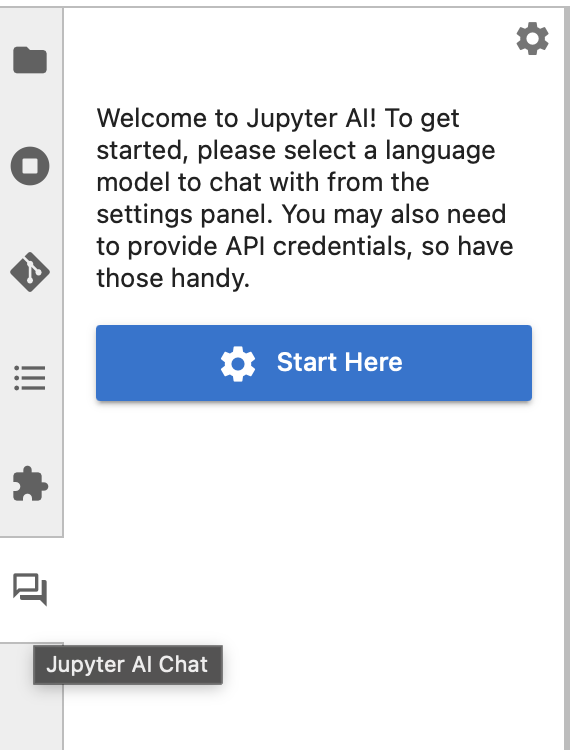
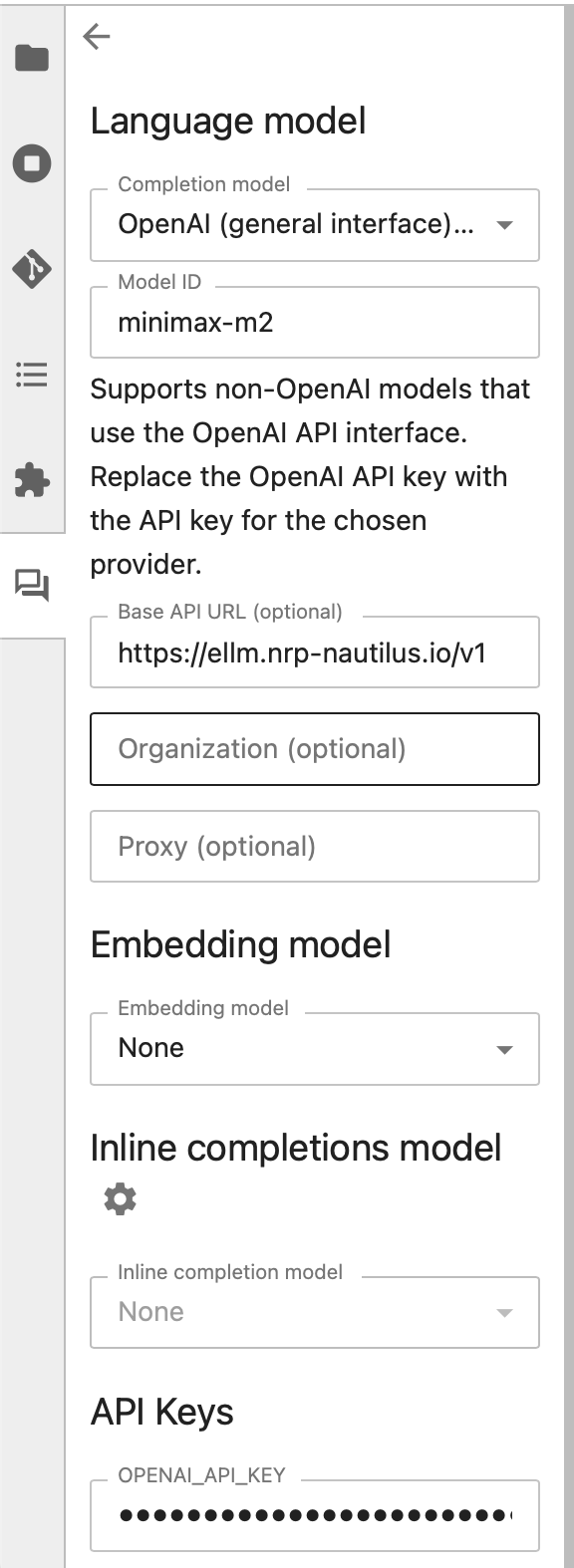
- Under Language model, point it at NRP instead of OpenAI's own API:
- Completion model: choose
OpenAI (general interface)...— this tells Jupyter AI to speak the OpenAI API format but let you supply your own server, instead of assuming platform.openai.com. - Model ID: the NRP model you want, e.g.
minimax-m2. - Base API URL (optional):
https://ellm.nrp-nautilus.io/v1— the sameOPENAI_API_BASEused everywhere else in this training. - Leave Organization and Proxy blank.
- Under API Keys, paste your token into OPENAI_API_KEY — your personal token from Lesson 1.
- Completion model: choose
- Close the settings panel and start chatting in the sidebar.
This is entirely optional — the rest of this notebook talks to NRP directly through the openai Python package, which works the same everywhere (JupyterLab, a script, your own machine) and doesn't depend on this extension being installed.
2. Basic Chat & the chat() Helper
The OpenAI chat API takes a list of messages, each with a role and content. You'll use three roles:
| Role | Purpose |
|---|---|
system | The system prompt — instructions that set the model's behavior/persona for the whole conversation. Sent once, usually first. |
user | What the human is asking. |
assistant | The model's own previous replies — sent back on later turns so it remembers the conversation (see Section 4). |
A few parameters worth knowing, including the ones our chat() helper below exposes as Python arguments:
| Parameter | What it does |
|---|---|
model | Which model to use — see the model table in the intro lesson. |
messages | The list of {role, content} turns described above. |
system (chat() helper arg) | Your system prompt as a plain string. chat() wraps it into a {"role": "system", "content": ...} message for you, so you don't have to build the messages list by hand. |
max_tokens | Hard cap on reply length. Reasoning models (minimax-m2, qwen3, gpt-oss) spend part of this budget thinking privately before answering, so give them more room (1000+) or you may get an empty reply. |
temperature | Randomness, from 0 (deterministic — same input gives the same answer) to ~1.5 (more varied/creative). 0.2 is a good default for factual or code answers. |
Define a reusable helper that handles both regular and reasoning models. Reasoning models (minimax-m2, qwen3, gpt-oss) think privately before answering, so they need a larger max_tokens.
def chat(prompt, model="gemma-small", system=None, max_tokens=1200):
    msgs = []
    if system:
        msgs.append({"role": "system", "content": system})
    msgs.append({"role": "user", "content": prompt})
    resp = client.chat.completions.create(
        model=model, messages=msgs, max_tokens=max_tokens, temperature=0.2,
    )
    msg = resp.choices[0].message
    if msg.content:
        return msg.content
    # Reasoning models stream thinking into a separate field
    reasoning = getattr(msg, "reasoning", None) or getattr(msg, "reasoning_content", None)
    if reasoning:
        return f"(reasoning only — increase max_tokens):\n{reasoning}"
return "(no content returned)"print(chat(
"What is the CMS detector and what is it used for?",
system="Answer in two sentences for an audience of physics graduate students.",
))Example output:
The CMS (Compact Muon Solenoid) detector is a general-purpose particle physics
detector at CERN's Large Hadron Collider, designed to observe a wide range of
particles and phenomena produced in proton-proton and heavy-ion collisions.
It is used to study the Standard Model, search for the Higgs boson and its
properties, and probe for physics beyond the Standard Model such as
supersymmetry and dark matter candidates.# Code generation — use gpt-oss which is strong at code tasks
print(chat(
"Write a short Python snippet using uproot to open a ROOT file called 'data.root',"
" read the TTree named 'Events', and print the number of entries.",
model="gpt-oss",
))# Try a reasoning model for a harder question
print(chat(
"Explain why the invariant mass of two muons is a useful observable for"
" searching for new particles decaying to mu+mu-.",
model="minimax-m2",
max_tokens=2000,
))3. System Prompts & Personas
The system prompt defines the model's role. Below: the same CMS question answered by four different roles. Swap in whatever is most useful for your workflow.
QUESTION = "How do I apply a muon pT > 20 GeV selection in CMS NanoAOD with Python?"

ROLES = {
    "Teaching assistant": (
        "You are a supportive teaching assistant for CMS physicists. Explain "
        "clearly with short examples, guiding the learner toward the answer."),
    "Technical coder": (
        "You are an expert HEP software engineer. Write clean, correct Python "
        "using coffea or uproot, then briefly explain it and note edge cases."),
    "Concise expert": (
        "You are a senior CMS physicist. Answer precisely in a few sentences "
        "for a graduate-level audience. No filler."),
    "Documentation writer": (
        "You are a CMS documentation writer. Structure your answer with headings, "
        "a code block, and a note on common pitfalls."),
}

for role, system in ROLES.items():
    print(f"\n{'='*60}\n=== {role} ===")
    print(chat(QUESTION, system=system, model="gemma-small"))
4. Multi-Turn Interactive Chat
Run this cell, then type questions at the prompt. The model remembers context across turns — like office hours. Type quit to stop, reset to clear history.
ROLE  = "Teaching assistant"   # change to any key in ROLES above
MODEL = "gemma-small"      # or minimax-m2, gpt-oss, qwen3

SYSTEMS = {
    "Teaching assistant": (
        "You are a supportive teaching assistant for CMS physicists. Explain "
        "clearly, build intuition with examples, and guide the learner."),
    "CMS expert": (
        "You are an expert CMS physicist. Answer precisely and technically."),
    "Technical coder": (
        "You are an expert HEP software engineer. Write clean Python and explain it briefly."),
}

history = []
print(f"Chatting as: {ROLE} ({MODEL}).  Type 'quit' to stop, 'reset' to clear.\n")
while True:
    try:
        msg = input("You: ").strip()
    except (EOFError, KeyboardInterrupt):
        print("\n(ended)"); break
    if msg.lower() in ("quit", "exit", "q", ""):
        print("Bye!"); break
    if msg.lower() == "reset":
        history.clear(); print("(conversation cleared)\n"); continue
    history.append({"role": "user", "content": msg})
    r = client.chat.completions.create(
        model=MODEL, max_tokens=1000, temperature=0.5,
        messages=[{"role": "system", "content": SYSTEMS[ROLE]}] + history)
    reply = r.choices[0].message.content or "(no reply)"
    history.append({"role": "assistant", "content": reply})
    print(f"AI: {reply}\n")
5. Embeddings & Semantic Similarity
qwen3-embedding converts text into vectors where similar meanings sit closer together. Semantic search is just a dot product between normalized vectors.
Why this matters for this audience — a few CMS-adjacent uses:
- Semantic search over your own docs — searching TWiki pages, analysis notes, or meeting minutes by meaning instead of exact keyword match. This is exactly what powers the RAG pipeline in Section 7 below.
- Finding related work — given an abstract or analysis strategy, surface similar past PAS/AN documents or papers.
- Dataset curation for model training — deduplicating or filtering a training corpus by semantic similarity. This is the classic ML-engineering use case (and probably the most familiar one if you've trained models before), but it's a step removed from what most of this audience will do day-to-day, since here you're mainly using an LLM rather than training one — think of it more as "why embeddings exist" than "what you'll reach for first."
import numpy as np
import matplotlib.pyplot as plt

def embed(texts):
    r = client.embeddings.create(model="qwen3-embedding", input=texts)
    v = np.array([d.embedding for d in r.data])
    return v / np.linalg.norm(v, axis=1, keepdims=True)  # normalize for cosine

docs = [
    "The Higgs boson was discovered by CMS and ATLAS in 2012 at the LHC.",
    "NanoAOD is a compact ROOT-based data format used for CMS physics analysis.",
    "Muon transverse momentum is reconstructed from tracks in the CMS tracker and muon chambers.",
    "Missing transverse energy signals the presence of undetected particles such as neutrinos.",
    "Deep neural networks are used in CMS for b-jet tagging and Level-1 trigger decisions.",
    "uproot and coffea are Python libraries widely used for CMS NanoAOD analysis.",
    "Cats like to nap in the sun.",  # deliberately unrelated
]

D = embed(docs)
query = "How does CMS measure the momentum of charged particles?"
sims = D @ embed([query])[0]

print(f"Query: {query}\n")
for i in sims.argsort()[::-1]:
    print(f"  {sims[i]:.3f}  {docs[i]}")
Example output:
Query: How does CMS measure the momentum of charged particles?

  0.712  Muon transverse momentum is reconstructed from tracks in the CMS tracker and muon chambers.
  0.634  The Higgs boson was discovered by CMS and ATLAS in 2012 at the LHC.
  0.601  Deep neural networks are used in CMS for b-jet tagging and Level-1 trigger decisions.
  0.589  uproot and coffea are Python libraries widely used for CMS NanoAOD analysis.
  0.571  Missing transverse energy signals the presence of undetected particles such as neutrinos.
  0.543  NanoAOD is a compact ROOT-based data format used for CMS physics analysis.
0.301 Cats like to nap in the sun.# Pairwise similarity heatmap
M = D @ D.T
fig, ax = plt.subplots(figsize=(7, 5))
im = ax.imshow(M, cmap="viridis", vmin=0, vmax=1)
labels = [d[:35] + "..." for d in docs]
ax.set_xticks(range(len(docs))); ax.set_xticklabels(labels, rotation=45, ha="right", fontsize=7)
ax.set_yticks(range(len(docs))); ax.set_yticklabels(labels, fontsize=7)
fig.colorbar(im, label="cosine similarity")
ax.set_title("CMS sentence similarity (qwen3-embedding)")
plt.tight_layout(); plt.show()6. Multimodal — Send a Detector Image
Vision models (gemma-small, gemma, qwen3) accept images alongside text. Below we send a CMS figure and ask the model to describe it. Swap IMG_URL for any detector plot or event display you want to query.
import base64, requests
from pathlib import Path
from IPython.display import Image, display

# A public CMS figure — replace with any image URL.
IMG_URL = "https://cms-results.web.cern.ch/cms-results/public-results/publications/HIG-19-004/CMS-HIG-19-004_Figure_005-b.png"
raw = requests.get(IMG_URL, timeout=30).content

# If the public URL above is rate-limited or unreachable, use the local copy
# in the workspace instead:
# raw = Path("../../images/CMS-HIG-19-004_Figure_005-b.png").read_bytes()

display(Image(data=raw, width=500))  # shrunk for display only — full-res bytes still go to the model

b64 = base64.b64encode(raw).decode()
r = client.chat.completions.create(
    model="gemma-small",
    max_tokens=300,
    messages=[{"role": "user", "content": [
        {"type": "text",
         "text": "This is a figure from a CMS physics paper. "
                 "Describe what you see: axes, distributions, and what physics measurement it likely represents."},
        {"type": "image_url", "image_url": {"url": f"data:image/png;base64,{b64}"}},
    ]}],
)
print("Model sees:\n", r.choices[0].message.content)
7. RAG — Answer from CMS Documentation
RAG (Retrieval-Augmented Generation) = embed your documents, retrieve the most relevant chunks for a question, then ask the LLM to answer only from that context. This keeps answers grounded and prevents hallucination on domain-specific content.
Here we point it at the LPC Physics Forum schedule — a real page that's updated regularly with upcoming talks. That's a good demonstration of RAG's real value: the LLM's own training data has a cutoff, but RAG lets it answer correctly about content added after that cutoff, as long as you retrieve it at question time.
Both the embedding model and the LLM are NRP-managed — nothing to install.
import html, re, requests

# --- Corpus: load and chunk a document ---
# The LPC Physics Forum schedule — a real, frequently-updated page, and a
# good stand-in for "a live doc I want an LLM to answer from correctly."
RAW_URL = "https://lpc.fnal.gov/programs/lpcpf/index.shtml"
raw_html = requests.get(RAW_URL, timeout=30).text

# Strip tags/scripts and decode HTML entities to get plain text
text = re.sub(r"<(script|style)[^>]*>.*?</\1>", " ", raw_html, flags=re.S | re.I)
text = re.sub(r"<[^>]+>", " ", text)
text = html.unescape(text)
text = re.sub(r"[ \t]+", " ", text)
text = re.sub(r"\n\s*\n+", "\n", text).strip()

# Chunk with slight overlap so context isn't cut mid-sentence
CHUNK_SIZE, OVERLAP = 700, 150
chunks = [text[i:i+CHUNK_SIZE] for i in range(0, len(text), CHUNK_SIZE - OVERLAP)]
print(f"Loaded {len(text):,} chars → {len(chunks)} chunks.")# Embed all chunks with qwen3-embedding (one API call)
chunk_vecs = embed(chunks)
print(f"Embedded {len(chunks)} chunks → dim {chunk_vecs.shape[1]}.")
def retrieve(question, k=3):
qv = embed([question])[0]
scores = chunk_vecs @ qv
top = scores.argsort()[-k:][::-1]
return [(chunks[i], float(scores[i])) for i in top]SYSTEM_RAG = (
"Answer the question using ONLY the provided context. "
"If the context does not contain the answer, say so explicitly. Be concise."
)
def ask_rag(question, model="minimax-m2"):
context = "\n\n".join(text for text, _ in retrieve(question))
return chat(
f"Context:\n{context}\n\nQuestion: {question}",
system=SYSTEM_RAG, model=model,
)
# Try a question that IS in the document
q1 = "When is the next LPC Physics Forum talk, and what is it about?"
print(f"Q: {q1}\nRetrieved chunks:")
for text, score in retrieve(q1):
print(f" score={score:.3f} {text[:65].strip()}...")
print("\nAnswer:", ask_rag(q1))# Try a question that is NOT in the document — model should decline
q2 = "What is the invariant mass of the Z boson?"
print(f"Q: {q2}")
print("Answer:", ask_rag(q2))Takeaways
- One
OpenAIclient with NRP'sbase_urlgives you chat, personas, embeddings, vision, and RAG — no GPU, no model downloads. - System prompts are a lightweight way to customize model behavior for specific roles in your workflow.
- Embeddings + cosine similarity = semantic search over any text corpus.
- RAG keeps answers grounded and honest — the model tells you when the answer isn't in the retrieved context.
Next: Agentic Workflows — point opencode at NRP's managed LLM and have it write CMS analysis code autonomously.
- One
openai.OpenAIclient, onebase_url, covers chat, embeddings, and vision. - System prompts control model behavior without changing the user-facing interface.
- Embeddings map text to vectors — semantic search is just a dot product.
- RAG = embed your docs, retrieve closest chunks, answer only from that context.